Buy
Showing posts with label Active Directory Security for Cyber Security Experts. Show all posts

Sunday, August 16, 2020

Putting a Pause on "Active Directory Security for Cyber Security Experts"

 Folks,

I am sorry to inform you that I have decided to pause the Active Directory Security for Cyber Security Experts for now.

The reason is remarkably simple - over the last few weeks, I've had sufficient opportunity to assess just how much most IT professionals know about Active Directory Security, and I have arrived at the conclusion that most organizations and their IT personnel do not even seem to know intermediate level Active Directory Security.

Thus, there does not appear to be much point in me trying to spend my extremely valuable time on trying to teach them the very basics of Active Directory Security, such as the profound yet substantial difference between knowing "Who has what permissions in Active Directory" and "Who has what effective permissions in Active Directory.

Instead, I have decided that we will try and find a way to democratize the unique insights that our Gold Finger tooling provides, for the whole world, so millions of IT professionals worldwide could make mission-critical privileged access assessments in Active Directory without having to invest hundreds of hours in learning advanced Active Directory Security.

In other words, there is no time to teach millions of IT professionals the level of Active Directory Security that they ideally need to know to be in a position to adequately secure and defend Active Directory deployments. Instead, it appears that we will just have to empower them to be able to do so quickly and efficiently.

I've asked our Engineering Team to work on this right away, and early next year we may introduce something to facilitate this objective, subsequent to which I will consider commencing "Active Directory Security for Cyber Security Experts."

Thank you. Be well and stay safe.

Best wishes,
Sanjay 

Wednesday, July 29, 2020

How to Easily Mitigate the Security Risk Posed by Mimiktaz DCSync


Folks,

Hello. I hope this finds you all doing well. This post is Day-7 of Active Directory Security for Cyber Security Experts.

Today, I will share with you how to easily mitigate the serious cyber security risk posed by Mimikatz DCSync hacking tool to Active Directory deployments, as well as walk through a real-world example in our Active Directory Security lab VM.


Overview

Mimikatz DCSync is a hacking tool written by Benjamin Delpy that is often used by perpetrators to swiftly and substantially compromise Active Directory deployments by letting them determine the passwords of all organizational domain accounts.


In short, if a perpetrator could successfully run Mimikatz DCSync against your domain, he/she/they could instantly find out everyone's passwords, from that of all Domain Admin accounts to that of the CEO's account to that of the krbtgt account.

In short, it would be Game Over in minutes, and the organization would have suffered a massive cyber security breach.


Root Cause

The simple reason that Mimikatz DCSync is able to determine the passwords of all domain accounts is that the account being used by the perpetrator has sufficient access so as to be able to request and obtain from Active Directory, the password hashes of all domain accounts, which it can then easily determine the clear-text version of.

To be specific, any user that has (i.e. is granted) sufficient privileged access in Active Directory to be able to replicate secrets from Active Directory can simply request Active Directory to provide it a copy of the entire domain contents, including all secrets i.e. password hashes of all domain accounts.

It logically follows that a perpetrator can only successfully use Mimikatz DCSync against an Active Directory domain if the compromised domain account that he/she is using has sufficient privileged access in Active Directory to be able to request and obtain secrets (i.e. password hashes) from Active Directory.

Speaking of which, the exact privileged access that is required to be able to obtain (replicate) secrets from Active Directory involves two Active Directory extended rights, and an attacker requires both of these permissions to be effectively granted -
  1. Replicating Directory Changes
  2. Replicating Directory Changes All

That's literally all that a perpetrator needs to be able to run Mimikatz DCSync against an organization's Active Directory.


Prevention

Organizations can in fact prevent perpetrators from being able to run Mimikatz DCSync against their Active Directory.

To do so, they need to first accurately identify, and then review and lockdown the list of all personnel who are currently authorized to, i.e. have sufficient privileged access to, be able to replicate secrets from their Active Directory domains.

Specifically, if organizations can accurately determine exactly which domain accounts have these two Active Directory extended rights effectively granted in the ACL protecting the domain root object, then they can easily determine exactly who all can run Mimikatz DCSync agains their Active Directory today.

Once they have done so, a review of this list will instantly identify and reveal all accounts that currently do but that should not have this level of privileged access, and if they can additionally determine the underlying security permissions in the ACL of the domain root object that entitle these accounts to the required privileged access, they can instantly and reliably lockdown those permissions to minimize this number down to virtually zero.

Subsequently, to maintain locked-down access, security conscious organizations will want to periodically (daily, weekly or biweekly) monitor (audit) any changes in privileged access (i.e. Active Directory effective permissions) on the domain root.


In short, a simple three-step process is all it takes to prevent the use of Mimikatz DCSync -

  1. Accurately identify who has sufficient effective permissions to replicate secrets from the domain
  2. Review list and lockdown access, by identifying and then tweaking the underlying entitling permissions
  3. Subsequently, monitor (audit) effective permissions on domain root to identify any changes in privileged access

By following this simple three-step process, organizations can easily prevent the use of Mimikatz DCSync against their foundational Active Directory, and prevent the credentials of the entirety of their user populace from being compromised.


A Classic Mistake

A classic mistake that many organizations often make when trying to determine who has the required privileged access to be able to replicate secrets from Active Directory is that they often only focus on identifying "Who has what permissions?" on the domain root object whereas in fact what they need to be doing is identifying "Who has what effective permissions?"

A simple analysis of "Who has what permissions" may not always include the impact of any deny permissions that may have been specific (directly or indirectly), or the impact of arcane nested group memberships, or the impact of any permissions granted to (dynamically evaluated) well-known security principals, or the impact of Special permissions etc.

Further, in most Active Directory deployments, there are almost always well over a hundred security permissions the ACL of the domain root object, so it is difficult, cumbersome and error-prone to make this determination with 100% accuracy.

Consequently, even organizations that know exactly what privileged access enables perpetrators to use Mimikatz DCSync may not always have the correct picture when it comes to who can actually run this tool in their environment.


The Correct Procedure

The simple and correct procedure to make this paramount cyber security determination involves accurately determining effective permissions on the domain root object to identify all individuals who are effectively granted both, the Replicating Directory Changes and the Replicating Directory Changes All extended rights.

Individuals who are on both the lists are the only ones who can successfully run Mimikatz DCSync against Active Directory.


A Step-by-Step Example

With this in mind, let us proceed to enact the three steps outlined above in our corp.local lab Active Directory domain.

  • Prerequisite: To follow along this example, you will need to download and use the completely free and ready-to-use accompanying lab Active Directory VM, which can be instantly downloaded from here.


Step 1

Let us begin by examining the ACL protecting the domain root object. To do so, simply launch Active Directory Users and Computers snap-in, select and right-click the domain-root object, click the Security tab and then click the Advanced button.

Active Directory security permissions in the ACL of the domain root object

As one can see, there are many Active Directory security permissions specified in the ACL for many security principals, some allowing and some denying access, and it does not seem easy to even just view these permissions in their entirety.


As an alternative, let us try using Microsoft's dsacls command-line utility to get a better picture of this ACL -

Unfortunately, even with dsacls it seems difficult to even just get a simple listing of all the security permissions in this ACL, perhaps because dsacls is more suited to perform Active Directory ACL modifications than it is to perform ACL analysis.


Today there are several solutions available to help make Active Directory ACL/security permissions analysis easier for everyone, and you are welcome to use any tool/solution of your choice to obtain a better picture and follow along.


I am going to proceed with the Microsoft-endorsed Active Directory ACL Analyzer, because it is the simplest, most capable and most trustworthy Active Directory ACL Analyzer that I know of (, and because I architected it) -

I was able to retrieve the object's ACL at a button's touch; status bar indicates that there are 59 permissions in the ACL.


Next, I click the View Details button and the tool now shows me a detailed view of the ACL, with the security permissions field/column broken down into individual, sortable columns, one for each of the 13 Active Directory security permission types, making it easy for me to sort the ACL and hone-in on just those permissions that impact Extended Rights (CR) -

The rich, detailed view (also available in the exportable CSV format) helped me make the following determinations -
  1. Of the 59 permissions in the ACL, there are 33 permissions that specify (allow/deny) extended right permissions
  2. Of these 33 permissions, 19 permissions directly or indirectly specify the two permissions we are interested in
  3. Of these 19 permissions, 13 permissions indirectly specify both the permissions we are interested in 
  4. Of these 19 permissions, 3 permissions directly specify the Replicating Directory Changes extended right
  5. Of these 19 permissions, 3 permissions directly specify the Replication Directory Changes All extended right
  6. Of these 19 permissions, 2 permissions deny access, and the remaining allow access
  7. Finally, altogether, these 19 permissions allow/deny access to 17 unique security principals

As one can see, this information in itself is already helpful because it has helped us determine which of the 59 security permissions in the ACL of the domain root object we need to take into account to make this determination.

In case it helps, here's a snapshot of the output of this tool, exported to CSV and opened in Excel -

Saliently, there are 17 security principals that we need to focus on, almost all of which are security groups that we will need to expand, and perhaps some of them may contain nested groups (of which some could be circularly nested) etc.

This also indicates that we will also have to perform conflict resolution because there are at least 2 security permissions that deny extended rights to 2 different security groups, either of which could be nested (, possibly even circularly nested).

  •  Side-note: Question - Does Bloodhound negate denies? If not, how can it be accurate?


Incidentally, I could also have just used the Active Directory Permissions Analyzer to make this very determination, without having to perform any kind of visual analysis i.e. I could have just specified that I am looking for exactly these permissions, and it would have instantly found them for me, making the task even easier -

However, this still leaves us with 16 security groups to completely expand (the 17th security principal being System itself,) and while we could proceed to do so, it would still involve some work, not to mention meticulously taking into account which permissions grant blanket access and which one grant specific access, negating allows with denies etc. etc.

Let us also keep in mind that in this case, we are looking at a small domain of a fictional organization so there are only 16 security groups to expand. In most real-world production Active Directory domain, there are over 100 security permissions and there could easily be many, many more security groups one may have to manually and meticulously expand!


This may make you wonder that there must be an easier way to do this. After all, can you imagine how much effort it might take us each time we needed to make this determination, and all such determinations in Active Directory.

Indeed, there IS actually an easier way, and in fact it is the only correct way to make this determination, and all such determinations, and that ONE simple, easy and correct way is called "Active Directory Effective Permissions"


In fact, its right there in Microsoft's native ADUC tooling's Advanced Security tab, and its called the Effective Access tab.

The importance of this tab is conveyed by the simple fact that it is one of the three tabs that exist in ADUC's Advanced Security tab, along with Permissions and Auditing, and it has existed since day one, i.e. since Windows 2000.

For years it was called the Effective Permissions tab, until Microsoft recently changed its name to Effective Access tab.


Well, if this tab exists in ADUC, let's just proceed to use it to make this determination, and IF IT CAN FULFILL OUR NEED, then there's no point in wasting our precious time on all that ACL/permissions analysis etc., so lets see if it can help us -


The first thing you'll notice is that you need to enter a user's name. As seen above, I entered the name of a specific user, Peter Jackson, and it showed me an approximation of the effective permissions that Peter Jackson has on the domain root. One can scroll down to see the full list of effective access that Peter Jackson is entitled to on this object.

Therein lies the problem. It can at most determine (approximate) effective permissions ONE USER at a time. :-( In other words, you can specify a particular user, and it will determine and show you the effective permissions for that ONE user.


In this demo Active Directory domain itself, there are over a thousand users and computers, and in most organizations there could be tens of thousands of users and computers, and I don't know about you, but most people do NOT have the time to enter ONE USER AT A TIME and then make a note of his/her effective permissions etc. as this would take weeks!

In short, Microsoft's Effective Permissions/Access Tab is hardly useful i.e. practically useless, and that's so unfortunate.

It is only useful to the point wherein you may want to find out what effective permissions a specific user may have. Further it cannot accurately calculate the complete set of effective permissions, and it cannot pinpoint which underlying security permission in the ACL entitles a user to a specific effective permission, which one needs to know to lockdown access.


Hmm. It seems like after all, even after twenty years, we'll just have to go right back to doing boring, complicated and laborious Active Directory permissions analysis, group membership evaluations, conflict resolutions etc. MANUALLY :-(


As I have said earlier, you can use any tool from any vendor you like to help you ultimately do ALL that is involved (i.e. ACL analysis, group membership expansions, allow vs. deny conflict resolution etc.) to make this determination accurately.


As for myself, I'm going to use this Microsoft-endorsed tool, and I'll be completely done in less than one minute -

This unique tool is the world's only accurate fully-automated effective permissions calculator for Microsoft Active Directory.

It can do, what no other tool or entity (i.e. person or company) in the world can - instantly and accurately determine the complete set of effective permissions entitled on any Active Directory object, identify exactly which accounts have these effective permissions, and pinpoint the underlying permissions that entitle these accounts to these effective permissions, all at the touch of a button.

As you can see above, all I had to do was point the tool to the domain root object, and click a button, and in less than a minute, it accurately determined and revealed the complete set of effective permissions entitled on this object, exactly who has these effective permissions, and which underlying permissions entitle a user to a specific effective permission.


I simply used the What drop-down to locate and select Extended Right - Replicating Directory Changes and it instantly showed me that a total of 40 accounts have this effective permissions on the domain root object -


Next, I used the What drop-down to locate and select Extended Right - Replicating Directory Changes All and it instantly showed me that a total of 40 accounts have this effective permissions on the domain root object -


Then, all I had to do was intersect these two lists, which I easily did by exporting the results to CSV and opening it in Excel.


Here is the list of 40 accounts that can run Mimikatz DCSync in the lab corp.local domain

Administrator, Alexander White, Andrew Cushman, Around Trust, Brandon King, Certify Suite, Control Engine, Darren Baker, David Edwards, DC, Donald Parker, Felix Defense, Frank Collins, George Carter, Greg Baker, Harper Anderson, Henry Moore, Isabelle Woods, James Cushman, Jane Moore, Jason Goodman, Kevin Johnson, Larry Phillips, Lauren Cruise, Lucas Allison, Mary Gates, Michael Young, Nancy Clark, Net Tricks, Nicholas White, Passive Server, Peter Brown, Peter Jackson, Ryan Clark, Simon Baker, Solar Breeze, Susan Douglas, Suzanne Goodman, Tim Young, Victor Branson

  •  Note - The accounts in red are unmanaged service accounts !

Thus, as seen above, it took me just a few minutes to complete step 1, which was to accurately identfy all accounts that possess sufficient privileged access to be able to replicate secrets from Active Directory.


Step 2

Now that we have accurately identified the list of all individuals/users/accounts who possess sufficient privileged access to be able to replicate secrets from Active Directory, its time to review and lockdown this list.


We have identified 40 accounts that possess this level of access. That is about 39 accounts too many if you ask me, and at least 30 accounts to many by most standards, so we need to review and reduce this list.

Perhaps a good place to begin is by reviewing the 7 unmanaged service accounts (from various vendors), on the list.

As seen above, there are 7 unmanaged service accounts that possess this high level of privilege. During an internal meeting this was discussed and it was determined that none of these 7 service accounts actually require the ability to replicate secrets, so we agreed to take away this privileged access from these service accounts.

The only question was how do we find out which one of those 59 security permissions in the ACL of the domain root is the one that entitles these 7 service accounts to this alarmingly high level of privileged access.

Fortunately, with the tool above, all I had to do was click on the names of these service accounts, and it pinpointed the exact security permission in the domain root object's ACL that was responsible for these service accounts having such a high level of privileged access -
Here's the underlying (culprit) permission:  Allow  corp\Administrators  Extended Right - Replicating Directory Changes All


A quick review of the membership of the corp\Administrators security group confirms the finding -


As we can see in the snapshot above, the Domain Admins security group is a member of the Administrators security group, and the Privileged Service Accounts group is a member of the Domain Admins security group.

Thus, it was this nested group membership that was entitling these 7 service accounts to this privileged access.


Incidentally, I actually used the following tool to view the complete nested membership of any Active Directory Security group, because it automatically shows me the complete nested group membership of any domain security group -

But I digress.

Now, to lockdown the privileged access granted to these 7 unmanaged service accounts, I have many options -
  1. I can remove these service accounts from the Privileged Service Accounts group
  2. I can remove the Privileged Service Accounts group from the Domain Admins group
  3. I can remove the Domain Admins group from the Administrators group
  4. I can modify or remove the security permission that grants this extended right to Administrators
  5. I can add an explicit deny permission denying the Privileged Service Accounts group one of these extended rights

In short, once I have enacted the above, these service accounts will no longer possess this privileged access on the domain root, and I will have reduced the number of accounts that can replicate secrets from Active Directory by 7!

Further, to verify that I correctly locked it down, I can simply run the tool again, and it will instantly show me the results.

In this manner, I can proceed to evaluate every account on this list, then make a determination as to whether or not that account requires the privilege to replicate secrets from the domain, and if not, I can lockdown access for each of these accounts, thereby substantially reducing the number of accounts with such a high level of privilege.

Most importantly, I now have complete control, because I have complete and accurate insight into exactly who has this level of privilege, and how i.e. I also know which underlying permission is entitling each such account to this privilege.

In this manner, I can eventually reduce this number down to just 2 - the System and the DC itself!


Step 3

It is important to note that it is not sufficient to merely identify these accounts and then lock the access down just once, but in fact to periodically audit who has this level of privileged access in your Active Directory.


The reason is simple - invariably, at least a few Active Directory admins and service accounts may still possess the ability to modify permissions on the domain root, and thus any action taken by them, whether intentional, accidental or coerced could change the state of access provisioned on the domain root.

In addition, any delegated admin who may be in control of a group membership that is currently granted this level of privilege on the domain root could also easily and indirectly cause the resulting effective access to change.

Thus, it is important to periodically review exactly who possesses this level of privileged access on the domain root, and as seen above, with the right tooling, it only takes a few minutes to make this determination.

We recommend that organizations review this at least on a fortnightly basis, if not on a weekly basis.


Something to Try

The accompanying lab AD Security VM is free to download and follow along this example, and others that I will be sharing.

In addition to what I have shared above, (which you can attempt with any tool of your choice), here's something you can easily try to see how the state of effective access changes, impacting who can run Mimikatz DCSync right away!


Select any existing user account from amongst the 1000+ domain user accounts in the VM and simply add this account to the IT Security Incident Response Team. 

When you do so, you'll find that this account will be able to instantly use Mimikatz DCsync against this domain!

Next, take the same account and this time around, also add it to the Contractors team.

When you do so, you'll find that the account will no longer be able to use Mimikatz DCSync against this domain!

When you add the account to the IT Security Incident Response Team, it ends up effectively getting both the extended rights needed to replicate secrets from Active Directory. Next, when you add the account to the Contractors team, it ends up being denied this very access, because the Contractors team is denied this access, so the explicit deny will override the explicit allow.

  •  Note - After you are done trying, please undo both changes, because otherwise the overall state of access in your copy of the demo AD lab VM will have changed, and the results of all examples that I will be sharing in days to come will differ in your AD, making it difficult to follow future examples.

This simple experiment shows how effective permissions and actually determine privileged access in Active Directory.


Conclusion

The objective of today's post was to show you how to easily mitigate the serious security posed by Mimikatz DCSync.


We began by identifying exactly what privileged access is needed to successfully run this tool against Active Directory, and then by learning how to correctly determine exactly who has this level of privileged access in Active Directory, because once we know that, we can lock it down and be in control, knowing at all times, exactly who could do so, and how.

We also touched upon the fact that it is important to make this determination periodically, because the state of underlying access can change, either directly or indirectly, impacting this in subtle ways that may not be apparent to the naked eye.

It is also very important to understand just how dangerous a threat the use of Mimikatz DCSync poses to Active Directory and to every organization that operates on it. A perpetrator only needs to run the tool ONCE and he/she would have instantly compromised the credentials of ALL your domain accounts, from the CEO to the CISO to the Domain Admin to every employee and every service account, as well as the krbtgt account.

In short, a single occurrence of this threat could result in a massive cyber security breach, that could cost the organization not just millions of dollars to recover from, but serious reputational damage as well, not to mention potentially substantial liability arising from the potential loss of all kinds of organizational data, such as customer PII, financials, trade secrets etc.

In contrast, it takes almost nothing at all to mitigate this serious threat and minimize the possibility of its occurrence, and today from the CEO to the CISO to the Domain Admin, all stakeholders must know what Mimikatz DCSync is.

Towards that end, possibly the single most important thing you could do for your organization today is to bring this to the attention of all stakeholders, and ensure that they understand this threat and how to protect your organization from it.

Here's a post you could share internally - A Massive Cyber Breach at a Company Whilst it was Considering the 'Cloud'

That's all for now.

Best wishes,
Sanjay.

Wednesday, July 22, 2020

Day-6 - An Overview of the Active Directory Security Lab Domain


Folks,

Hello. I hope this finds you doing well. This post is Day-6 of Active Directory Security for Cyber Security Experts.


Today, I'll share an overview of the contents of the Active Directory Security Lab VM setup, i.e. the contents of the lab domain that we will be using to learn more about Active Directory security, so we are all sufficiently familiar with it.


Overview

The lab Active Directory Security virtual machine contains a Windows Server 2019 based single domain forest.


The following is an overview of this lab domain, corp.local -
  1. There are 3002 objects in this domain, located in and across 277 organizational units and 141 containers
  2. There are 277 OUs in a well-defined hierarchy, based on administrative delegation and GP inheritance needs
  3. There are 1000 domain user accounts, including privileged, employee, contractor and executive accounts
  4. There are 1191 domain computer accounts, including for laptops, workstations and  servers in data-centers
  5. There are 284 domain security groups, including 50 privileged access groups and various departmental groups
  6. There are 14 GPOs linked to various OUs, as well as 4 service connection points, 10 contacts and 3 printers
  7. There are 5 managed service accounts (MSAs), 5 MSA groups, and 7 legacy service accounts in the domain
  8. There are 100 IT personnel that are members of 33 IT security groups representing various IT/security roles
  9. There are 182,866 ACEs in 3002 ACLs that specify various security permissions for various security principals
  10. There are 17 default administrative (privileged access) groups that contain a total of 23 domain user accounts


OU Structure

The realistic OU structure for the corp.local domain of this fictional organization is designed based on the organization's geographical locations, administrative delegation requirements and group policy inheritance needs.


The following is how the OU structure is laid out -
  1. The top-most level OU is the Global OU,  ou=global,dc=corp,dc=local
  2. Within the Global OU are the OUs for each continent/region in which the company has operations
  3. Within each continent/region OU are OUs for all countries in that region where the company has a presence
  4. Within each country, there are OUs for each city where the company has an office
  5. Within each city, there is Users OU and an Computers OU, the only exception being the San Francisco OU
  6. This company is headquartered in San Francisco so its OU contains departmental OUs for various departments including Research, Development, Sales, Marketing, Finance, Legal, Human Resources, Executives, Security & IT
  7. All IT user accounts, workstations and security groups are located in the IT OU within the San Francisco OU

There are several administrative delegations done in the ACLs of various OUs, including a common set of delegations on the top-level Global OU, and continent/region specific delegations at the those OU levels, and finally on departmental OUs.

The IT OU is noteworthy, for in it reside all the IT admin accounts, IT workstations, IT groups as well as all legacy service accounts. There are several delegations made in this OU to provide additional protection for IT accounts, computers and security groups. IT accounts that are members of the various default admin groups are protected by AdminSDHolder.


IT/Privileged Access Groups

There are 33 IT groups that are used to delegate administrative (privileged) access across this Active Directory domain, and they reside in the IT Security Groups OU, which resides in the IT OU within the San Francisco OU.


These 33 IT security groups span the following IT management categories and have been duly delegated/provisioned privileged access (i.e. security permissions) in Active Directory to facilitate their respective role responsibilities -
  1. IT Management and Internal Audit - IT Managers, IT Service Management Team, IT Auditors, IT Contractors
  2. Directory Services Management - IT Critical Infrastructure Admins, IT Directory Services Management Team
  3. Privileged Access Management - IT Access Control Team, IT Admin Support Backup Team, IT Admin Support Team
  4. Identity & Access Management - IT Identity Management Team, IT Access Management Team, IT Help Desk Team
  5. Host Management - IT Host Management Team, IT Americas Admins, IT EMEA Admins, IT APAC Admins
  6. Messaging & Collaboration - IT Exchange Admins, IT Exchange Support Team
  7. Application & Database Management - IT Database Admins, IT Application Development Team
  8. Security Incident and Response - IT Security Incident Response Team, IT Contingency Support Team
  9. Cyber & Network Security - IT Cyber Security Team, IT Network Operations Team, IT Data Security Team, IT Group Policy Management Team, IT Executive Support Team, IT Network Security Team, IT Local Admin Teams
  10. Special Operations - IT Special Ops, IT Cloud Computing Team, IT Security Analysts, IT Data Center Team

Thus, as seen above, there are numerous IT groups that have been granted various levels of access in this domain.


Administrative Delegations

As noted above, numerous administrative delegations have been done across this Active Directory domain to facilitate the access that the above mentioned groups need in order to carry out their responsibilities.


For instance, here are some high-level delegations that have been done to provision sufficient access -
  1. Identity Management Team - Privileged access to be able to create, manage and delete domain user accounts
  2. Access Management Team - Privileged access to be able to create, manage and delete domain security groups 
  3. IT Help Desk Team - Privileged access to be able to perform password resets and unlock accounts
  4. IT Admin Support Team - Privileged access to be able to manage IT/privileged access accounts
  5. IT Local Admin Teams - Privileged access to be able to manage local computer accounts 
  6. IT Group Policy Management Teams - Privileged access to be able to link manager GPOs and link them to OUs
  7. IT Access Control Team - Privileged access to be able to modify permissions in Active Directory 
  8. IT Executive Support Team - Privileged access to be able to manage high-value executive accounts
  9. IT Cloud Computing Team - Privileged access to be able to integrate AD with cloud services
  10. IT Special Ops -  Special privileged access to be able to perform certain sensitive operations  

In this manner, every domain security group listed above has been granted various security permissions in this domain.


Default Administrative Group Memberships

To make this lab VM as realistic as possible, just like in the real world, several default administrative groups are in use, and custom IT security groups have been made members of these groups to facilitate unrestricted privileged access.


For instance, the following are the direct group memberships of some of the default administrative groups -
  1. Administrators - Administrator account, Enterprise Admins, Domain Admins
  2. Enterprise Admins - Administrator account, IT Critical Infrastructure Admins
  3. Domain Admins - Administrator account, IT Directory Services Management Team, Privileged Service Accounts
  4. Schema Admins - Administrator account
  5. Backup Operators - IT Directory Services Management Team
  6. Server Operators - IT Directory Services Management Team, IT Host Management Team
  7. Accounts Operators - <empty>
  8. Print Operators - <empty>
  9. Domain Controllers - <empty>
  10. Read-only Domain Controllers - <empty>
  11. Replicator - <empty>
  12. Key Admins - <empty>
  13. Enterprise Key Admins - <empty>

Thus, as seen above, most default administrative groups have been used as they would be in a real-world deployment.


AdminSDHolder

As you know, the ACL protecting the AdminSDHolder object in the System container is stamped on all default administrative accounts and groups and serves to provide them additional protection.


To facilitate privileged access management of these default administrative accounts and groups, as well as to explicitly prevent certain groups from having any access on them, the AdminSDHolder ACL has been accordingly modified, and includes several Deny and Allow permissions for various non-default administrative/IT groups.

Further, there are a total of 13 default administrative groups and 4 non-default administrative groups protected by AdminSDHolder, and they contain a total of 23 domain user accounts, including the default Administrator account.


Domain Root ACL

The ACL protecting the domain root object has also been modified, as is usually the case in most Active Directory deployments, and several administrative delegations have been made in this ACL.


Thus, there are many additional security permissions in this ACL, some controlling access on the domain root object itself, and other inherited permissions controlling and impacting access domain-wide.


Summary

In today's lesson, we took a closer look at the contents of our lab VM Active Directory domain so that we could become familiar with its contents. We now have a better understanding of its OU structure, its contents, administrative delegations and the existence of various custom permissions across the domain, including notably on the domain root, the Global OU, the Executives OU, the IT OU and on the AdminSDHolder object.

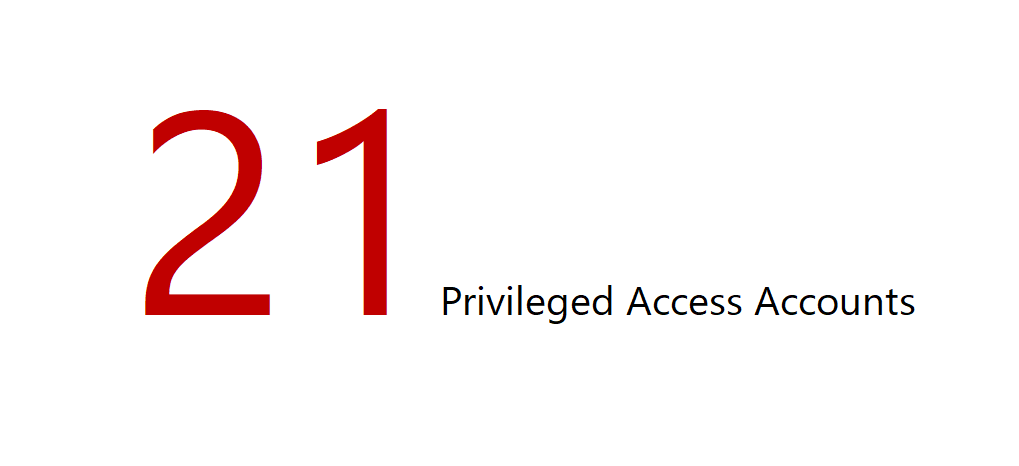
Further, and more importantly, as it pertains to privileged access, we know also know that there are a total of 21 domain user accounts (which includes 7 legacy service accounts) that are considered to be privileged in nature, as they are all directly or indirectly members of all default and other administrative groups that are being protected by AdminSDHolder.

However, is the real number of individuals who possess privileged access in this domain 21, or is it greater?!

Tomorrow onwards, we'll start deep-diving into various aspects of privileged access, and during these exercises, we will learn how to correctly identify and lockdown privileged access in Active Directory, and how to bullet-proof Active Directory.

That's all for now.

Best wishes,
Sanjay

Wednesday, July 8, 2020

How Active Directory Security Permissions Control Privileged Access


Folks,

Hello. I hope this finds you doing well. This post is Day-5 of Active Directory Security for Cyber Security Experts.


In today's post, I wanted to make the essence of Active Directory Security super simple for everyone to understand, because this is necessary before we dive into analyzing the many specific examples in the accompanying demo VM.


Active Directory Security, Distilled

Perhaps the best way to understand Active Directory is by distilling it down to ten simple points -


  1. Every thing inside Active Directory is an Active Directory object

  2. Every object in Active Directory is protected by an access control list (ACL)
  3. Every ACL protecting every object contains zero or more access control entries (ACEs)
  4. Every ACE allows or denies one or more security permissions for a specific security principal (SP)
  5. Every security principal (account, group, well-known/F SP) is uniquely identified by its security identifier (SID)
  6. Every account has an access token that contains its SID and the SIDs of all security groups* to which it belongs

  7. Every security permission specified in an ACE is either explicit (set on the object) or inherited (from the parent)
  8. Every security permission is either a standard Active Directory permission, an extended right or a validate write

  9. Every ACE in the ACL is placed in accordance with a precedence order that governs how ACEs impact the resulting (i.e. effective) access for a user, which is:  Explicit Deny > Explicit Allow > Inherited Deny > Inherited Allow

  10. When a user requests access to an AD object, the system performs an access check that examines the ACEs in the object's ACL to determine a) whether or not any SID in the requestor's access token is denied any of the requested access in any of the ACEs in the ACL, and b) whether or not one or more ACEs in the ACL allow all of the requested access rights, and the outcome of this access check governs whether or not the requested access is granted.

    Consequently, the actual (i.e. effective) access that a user has on an AD object is determined by the impact of all ACEs in its ACL that allow or deny some form of access for the user, or for any group* to which the user belongs.


Active Directory Security Permissions

If everything in Active Directory is an AD object protected by an ACL in which lie ACEs that grant various Active Directory security permissions, then we must possess a very good understanding of these Active Directory security permissions.


There are thirteen types of Active Directory Security Permissions -
  1. Read Control (RC) - These permissions control who can read security permissions specified in AD object ACLs.

  2. List Child (LC) - These permissions control who can view the child objects of a specific object in AD.

  3. List Object (LO) - These permissions only come into play in a special mode in Active Directory called the List Object mode, and in that mode they provide more granular control on who can view individual child objects of an object.

  4. Read Property (RP) - These permissions control who can read the properties of an AD object. The Object Type field can be used to specify that they only control read access to a specific property (or a property set) on the object.

  5. Write Property (WP) - These permissions control who can modify the properties of an object. The Object Type field can be used to specify that they only control write access to a specific property (or a property set) on the object.

  6. Create Child (CC) - These permissions control who can create an object under an object in AD. The Object Type field can be used to specify that they only control the creation of objects of a specified object class e.g. user.

  7. Standard Delete (SD) - These permissions controls who can delete an object via a standard delete operation.

  8. Delete Child (DC) - These permissions control who can delete child objects of an object. The Object Type field can be used to specify that they only control the deletion of objects of a specified object class e.g. user.

  9. Delete Tree (DT) - These permissions control who can delete a tree of objects in AD via a delete-tree operation.

  10. Modify Permissions (WD) - These permissions control who can modify permissions protecting an AD object

  11. Modify Owner (WO) - These permissions* control who can modify the owner of an AD object

  12. Extended Right (CR) - These permissions control who can enact special operations in AD. The Object Type field can be used to specify that they only control a specific special operation on an object (e.g. Reset Password etc.)

  13. Validated Write (SW) - These permissions control who can enact certain special writes (that require validation) on certain AD objects. The Object Type field can be used to specify that they only control a specific validated write on an object.

  14. SDDL: The two-letter abbreviations (e.g. RC, LC, LO, RP, WP, CC, SD, DC, DT, WD, WO, CR and SW) that follow the names of these various permissions are the SDDL mnemonics used to specify these permissions.

The above is a simplified explanation of AD security permissions. For details, please refer to Microsoft's documentation.

Once you have a good understanding of these thirteen Active Directory Security Permissions and how they work, it is easy and straightforward to understand how they impact and govern exactly who has what privileged access in Active Directory.


How Active Directory Security Permissions
Control Privileged Access in Active Directory

In light of the above, every privileged action that can be enacted in Active Directory boils down to a user requesting, and the resulting access check permitting, the ability to perform a simple modify operation on an Active Directory object.


Here are the Top-10 administrative (i.e. privileged) tasks in Active Directory AND the modify access they involve -

  1. Create a user account - Requires "Create Child User-object" effective permissions on target object

  2. Enable an account - Requires "Write Property userAccountControl attribute" effective permissions on user object

  3. Reset an account's password - Requires "Extended Right Reset-password" effective permissions on user object

  4. Change a group membership - Requires "Write Property member attribute" effective permissions on group object

  5. Change a user's membership - Requires "Write Property member attribute" effective permissions on group object

  6. Modify an object's ACL - Requires "Modify Permissions" effective permissions on target object

  7. Link a GPO to an OU - Requires "Write Property gpLink attribute" effective permissions on OU object

  8. Change a computer's DNS name: Requires "Validated Write Change DNS Host Name" on computer object

  9. Delete an Organizational Unit (OU) - Requires "Standard-Delete" effective permissions on OU object, or "Delete-Child" effective permissions on parent* object, or "Delete Tree" effective permissions on any ancestor object

  10. Replicate secrets from domain - Requires two extended rights, "Extended Right Get Replication Changes" and "Extended Right Get Replication Changes All" effective permissions on the domain root object

In short, enacting a privileged action in Active Directory requires a specific type of access on specific target AD objects, and anyone who has sufficient required effective permissions on these target objects can enact these privileged actions.

Thus, once you know exactly which security permissions entitle a user to a specific privileged action in AD, you can find out exactly who was what privileged access where and how in AD, by determining who has those effective permissions.


Top-10 Examples of Privileged Access in Active Directory

Here are ten simple, common examples of administrative tasks that require/involve privileged access in Active Directory, and as we have seen above, it is Active Directory security permissions that control exactly who can enact these tasks -

  1. Create a new domain user account for legitimate or nefarious use

  2. Delete an existing account or group, or an OU containing thousands of accounts and groups

  3. Enable a currently disabled domain user account, or unexpired an expired domain user account

  4. Reset a domain user account's password, such as that of the CEO or the default Administrator account

  5. Modify a domain security group's membership, such as that of the all-powerful Domain Admins security group

  6. Modify security permissions on an AD object, such as on the domain root, an OU or the AdminSDHolder object

  7. Link a group policy (GPO) to an OU, for legitimate or nefarious (e.g. unleashing ransomware domain-wide) use

  8. Modify a domain-joined computer's account in AD, such as by setting it to be Trusted for Unconstrained Delegation

  9. Modify the keywords associated with a critical service connection point, such as one used to integrate with Azure.

  10.  Replicate secrets from Active Directory (the enactment of which is almost always for nefarious reasons)

Thus, as you can, virtually every privileged action that somone could enact in any Active Directory deployment worldwide, is controlled and governed by the various Active Directory security permissions that reside in Active Directory object ACLs.


Specifically, if you connect the three dots above (i.e. the three aspects of AD Security described above), then you'll know that ALL privileged access in Active Directory is governed by "who has what effective permissions in Active Directory" because multiple ACEs in an object's ACL could impact whether or not the access requested by a user is granted.


Summary

That'll be all for today. Today, I just wanted to share with you three essential technical aspects of Active Directory Security that today govern and control exactly who has what privileged access at 85% of all organizations across the world today.


Speaking of which, did you know that for years IT professionals at organizations have errantly believed that to find out who has what privileged access in Active Directory, they just need to analyze permissions in Active Directory, whereas in reality, it is not "who has what permissions in Active Directory" but in fact "who has what effective permissions in Active Directory" that governs who has what privileged access in Active Directory.

Consequently, today most organizations do not even possess the means to audit effective permissions in Active Directory; they only possess the means (tools) to find out "who has what permissions" which is vastly insufficient and mostly futile, and as a result, most of them have no idea as to exactly who has what privileged access in their Active Directory today.


That's it for now. There's only one more theory lesson remaining before we can dive into over a dozen exciting examples that exist in the accompanying demo VM, and in the next lesson i.e. Day 6's lesson, I will cover that theory lesson by shedding light into the most important technical aspect of Active Security - Active Directory Effective Permissions.


Best wishes,
Sanjay.


PS: Answers to the 3 simple questions I had asked in my previous post -
  • Number of ACEs domain-wide: 177396 (excluding objects in the System container.)
  • Number of members in Domain Admins security group: 13
  • Number of ACEs that directly/indirectly impact Write Property Member in ACL of the Domain Admins group: 9*
  • Amount of time it took me to make these determinations: Less than 1 minute (each.)

Monday, June 29, 2020

Day 4 - Active Directory Security Permissions, Tooling AND a Challenge


Folks,

Hello. I hope this finds you doing well. This post is Day-4 of Active Directory Security for Cyber Security Experts.


TODAY, we'll begin by 1) re-visiting a simple fact, 2) putting your arsenal together and 3) YOUR first challenge.


Active Directory Security Permissions - The Keys to Every Door in the Kingdom

If you're into IT or cyber security, then you likely already know this ONE simple technical fact which is worth reiterating -

  1. 85% of all organizations worldwide operate on Microsoft Active Directory - From Microsoft to Amazon, and from the White House to the entire U.S. Government, every relevant organization in the world operates on Active Directory.

  2. 100% of everything in Active Directory is an AD object protected by an ACL - From the Domain Admins group to the domain root object, to every employee's (e.g. CEO, CISO etc.) account and computer, to every security group (e.g. All Employees, Executives etc.) used to lockdown access to every IT asset in the organization (i.e. all files, folders, Exchange mailboxes, databases, apps, portals etc.), literally everything is an object in Active Directory.

  3. It is the complete set of Active Directory security permissions that exist in the ACL (access control list) of every Active Directory object that collectively govern exactly who can do what on that Active Directory object.

If you connect the above three dots, you'll arrive at the conclusion that at the end of the day, it is Active Directory security permissions that ultimately protect and govern the security of virtually every IT asset in every organization worldwide.

In short, not just the "Keys to the Kingdom", the "Keys to Every Door in the Kingdom" lie in AD Security Permissions.


Three Technical Pointers

Given the paramount importance that Active Directory Security permissions play in organizational cyber security today, in order to gain proficiency in Active Directory Security, one must know Active Directory Security permissions well.


So, here are a few technical pointers that I recommend we all go through to learn more about them -
  1. Active Directory Security Permissions (here), How Access Checks work (here) & Order of ACEs in a DACL (here)

  2. Best Practices for Delegating Administration in AD, Appendix C: Active Directory Security Permissions (See * below)

  3. Best Practices for Delegating Administration in AD, Chapter 2: How Delegation Works in Active Directory (" * below)

  • * Note: The content referenced in 2 and 3 above was part of a 400 page whitepaper I had written while I was at Microsoft, titled "Best Practices for Delegating Administration in Active Directory". For reasons best known to Microsoft, it was removed from its Technet Site. Fortunately, you can still access it if you know where to find it. The only place it is available is as a part of "Windows Server 2003 Retired Content", which is a massive 150 MB PDF file which you can still download from here. To locate this content in that download, install Adobe PDF Reader (needed to open the massive 150 MB PDF), open the PDF and search for my name in it (Page: 8186.)

Please take a few moments to review and learn from these simple yet vital technical pointers. I apologize that there is no good content online from Microsoft to share with you - not sure why Microsoft has pulled so much important content. :-(


Finally, if you have more time and truly want to gain a deep understanding of how access control, access checks, access assessment etc. all work in Active Directory, you can review this authoritative patent on the subject, which today is cited by Microsoft, Palantir, CyberArk, Quest, Amazon, Vmware, IBM and other notable companies.


Active Directory Permissions Analysis Tooling

Over the next day thirty days, I am going to be issuing ten challenges, each one motivated by the desire to teach you something specific and valuable, and each one involving and requiring you to analyze permissions in Active Directory.


So, please feel free to put together your own arsenal of tools so you can accept these ten simple, educative challenges.

Further, to help you put this together, here's a list of just about every tool that I know of that can help organizations analyze Active Directory Security Permissions today, listed in alphabetical order by name of the tool to ensure objectivity -
  1. Acldiag (Microsoft)
  2. Aclight (CyberArk)
  3. Active Directory ACL Analyzer (Paramount Defenses)
  4. Active Directory ACL Exporter (Paramount Defenses)
  5. Active Directory Effective Permissions Calculator (Paramount Defenses)
  6. Active Directory Effective Access Auditor (Paramount Defenses)
  7. Active Directory Permissions Analyzer (Paramount Defenses)
  8. Active Directory Permissions Reporting Tool (ManageEngine)
  9. Active Directory Privileged Access Auditor (Paramount Defenses)
  10. AD ACL Scanner (Robin Granberg ?)
  11. AD Permissions Reporter (CJWDev)
  12. BeyondTrust Auditor (BeyondTrust)
  13. Bloodhound (SpectreOps)
  14. Dsacls (Microsoft)
  15. Effective Permissions Reporting Tool (Netwrix)
  16. Enterprise Reporter for Active Directory (Quest)
  17. Hyena (Systemtools)
  18. LepideAuditor (Lepide)
  19. Permissions Analyzer for Active Directory (SolarWinds)
  20. PowerShell for Active Directory (Microsoft)
  21. Stealthaudit Active Directory Permissions Analyzer (Stealthbits)
  • Note: The mere mention of any 3rd party tool above is not and should not be considered an endorsement.

The only tools that you cannot currently (i.e. yet) have in your arsenal are those developed by Paramount Defenses.

You're welcome to use any other tools to fulfill the various challenges I'll be sharing soon. If your organization currently uses a particular tool, I recommend using it to see if it can help you get the answers to these upcoming challenges.


Your First Challenge

Your first challenge is a very simple challenge, and I expect each one of you to be able to easily fulfill this challenge.


Using any tool(s) of your choice that are in your Active Directory security arsenal, please analyze the security permissions in the Active Directory Security Lab VM that I have shared, and simply answer the following three simple questions -

  1. Exactly how many security permissions (ACEs) are there domain-wide in the corp.local domain?

  2. Exactly how many members does the Domain Admins security group have? 

  3. Exactly how many security permissions in the ACL protecting the the Domain Admins security group directly or indirectly impact "Write Property - Member" permissions ?

  • These are really simple warm-up questions. Your answer can be as simple as >   1) 100,000     2) 5     3) 4

The answer to question 1 helps determine how large the attack surface is. The answer to question 2 is (sadly) the (mere) extent to which many organizations go to to audit privileged access in Active Directory, and the answer to question 3 begins to scratch the surface when trying to determine who actually has what privileged access in an Active Directory.

You can answer these three simple questions below in a comment, or answer them in my LinkedIn post for today's lesson.


The Importance of Exactness

In Active Directory Security, exactness is very important. In fact, it is paramount because it only takes ONE compromised, malicious or coerced Active Directory privileged user to completely own, compromise and destroy the entire organization.

Here's proof - did you know that almost all major recent cyber security breaches, including JP Morgan, Target, Sony Hack, Snowden, the OPM Breach, Anthem, Avast, the United Nations and others all involved the compromise and misuse of just ONE Active Directory privileged user account.


Perhaps the best way to think of it is this - ask yourself if you would board a flight if I told you that the Metal Detector at the airport was not entirely accurate; you know, one that could do the job with about 75% accuracy (leaving a 25% chance that an explosive device or a firearm could make it past the security checkpoint and on to the plane you're going to be on.)

I know I wouldn't. Would you?   (If you care, don't accept approximate answers ; demand and expect exact answers.)


That's All for Today

Today's simple challenge is intended to lay the foundation for the next ten challenges, and the level of difficulty will only increase with each challenge, so I encourage everyone to accept and embrace this and all following challenges.

By the way, I decided to start simple because there are many folks who are tuned in, and for some of whom, even simple ACL analysis may be a first-time experience. So, to experts who may find these simple challenges simple, please wait for the next challenge, and no matter how advanced you are in Active Directory Security, you will have a worthy challenge :-)

That's it for today. I'll post Day-5 on July 04, and in it, I'll share the answers, including how I make these determinations, AND I'll share your next challenge, which clearly and directly impacts every organization's foundational cyber security today.

I look forward to your answers - answering these 3 questions shouldn't take more than 10 minutes.

Best wishes,
Sanjay.

Corporate Headquarters

620 Newport Center Drive, Suite 1100
Newport Beach, CA. 92660. USA.


Telephone: 001-949-468-5770

© 2006 - 2026 Paramount Defenses. All Rights Reserved.

Your Privacy

We use cookies to give you the best online experience. Please let us know if you accept these cookies.