Buy
Showing posts with label Privileged Access Audit. Show all posts

Friday, October 15, 2021

The Top-25 Active Directory Privileged Access Reports

Folks,

Today over 85% of organizations worldwide operate on Microsoft Active Directory, and at these foundational Active Directory deployments, privileged access in Active Directory constitutes the proverbial "Keys to the Kingdom."

Privileged access in Active Directory is the most powerful access that an individual can possess in organizations that operate on Active Directory, because it grants complete, instant and unrestricted organization-wide access, including administrative to virtually everything in the Cloud.

Consequently, the need to know exactly who possesses privileged access in Active Directory is absolutely paramount.


The Top-25 Active Directory Privileged Access Reports

To help all organizations worldwide sufficiently identify what constitutes Domain Admin level unrestricted privileged access in their Active Directory, today we are sharing a list of the Top-25 Active Directory Privileged Access Reports. 

Top-25 Active Directory Privileged Access Reports

We highly recommend that all organizations that operate on Active Directory accurately identify and lockdown the number of individuals that possess Domain Admin equivalent privileged access in their foundational Active Directory today.

Best wishes,
Sanjay   

Wednesday, May 5, 2021

The $ 25,000 Gold Finger Mini Challenge

Folks,

I hope this finds you doing well. Today, we are announcing our second global Gold Finger Mini Challenge for US $ 25,000.


The $ 25,000 Gold Finger Mini Challenge


We are excited to announce an award of US $ 25,000/- to the first individual who can identify any solution in the world, other than Gold Finger, that can demonstrably do what the Advanced level of Gold Finger Mini can. Details below -


Here are the Top 7 Active Directory Privileged Access Audit that the Advanced level of Gold Finger Mini can provide -   
  1. Who can replicate secrets (password hashes) from an Active Directory domain? 
  2. Who can reset the password of an Active Directory domain user's account?
  3. Who can disable the use of Smartcards on an Active Directory account?
  4. Who can change an Active Directory security group's membership?
  5. Who can change security permissions on an Active Directory OU?
  6. Who can link a group policy (GPO) to an Active Directory OU?
  7. Who can create an Active Directory user account in an OU? 

The need to know exactly who can enact these privileged tasks is absolutely paramount.


Paramount Privileged Access Insights

The unauthorized, accidental or coerced enactment of virtually all administrative tasks listed above could instantly result in a colossal breach far greater (damaging) in impact than even the recent SolarWinds Hack.


Consider this -
  1. Anyone who could replicate secrets from Active Directory, effortlessly enactable via the use of Mimikatz DCSync, could instantly compromise the credentials of all (thousands) of organizational domain user accounts resulting in a colossal breach bigger than the Solar Winds Hack.

  2. Anyone who could reset the password of a domain user account would in effect have instantly compromised the identity of that account, such as that of a C-Level Executive, a Software Developer etc. He/she could then login as that account and instantly obtain access to everything that account has access to. If the target were an Active Directory privileged user account, it would be tantamount to a colossal, system-wide breach.

  3. Anyone who could disable the use of Smartcards for interactive logon, would in effect have downgraded security on that account, forcing authentication to being password based, and a simple password reset of that domain user account could be used to instantly compromise it.

  4. Anyone who could change the membership of a domain security group could instantly obtain domain-wide access to all IT resources that the compromised group has access to, such as All Employees, Source-Code Access, Accounting, Cloud Global Admins etc. If the target were an Active Directory privileged group, such as Domain Admins, it would be tantamount to a colossal, system-wide breach.

  5. Anyone who could modify the security permissions on an Active Directory OU could easily gain privileged access on all Active Directory objects e.g. user accounts, computers, security groups, service connection points etc. that reside in that OU. In numerous ways, this could easily be used to elevate/escalate privilege and gain Domain Admin equivalent access, resulting in a colossal breach.

  6. Anyone who could link a GPO to an Active Directory OU could instantly control the security of all computers whose domain computer accounts reside in that OU. This could be used to easily circumvent all endpoint-protection controls, deliver malicious payloads or instantly unleash malware on thousands of domain-joined computers.

  7. Anyone who could create a domain user account in Active Directory could then use that account to engage in nefarious activities that couldn't be traced back to a uniquely identifiable individual, thereby enabling the perpetrator to evade accountability while engaging in nefarious recon or attack activities.  

Consequently, the need to know exactly who can enact these administrative tasks in an organization's foundational Active Directory deployment is absolutely paramount to organizational cyber security today. 


The $ 25,000 Challenge

Our challenge is simple. All you need to do is -
  1. Try the Advanced level of Gold Finger Mini, downloadable from here, to experience its unique capabilities.

  2. Identify any solution in the world, other than Gold Finger, that you believe can do what Gold Finger Mini can.

    Specifically - Identify any solution in the world that can accurately deliver the 7 paramount insights listed above.

  3. Compare and verify the results of the identified solution with Gold Finger Mini's results in the same AD domain. For your convenience, a ready to use lab AD domain with Gold Finger Mini pre-installed, can be downloaded from here.

If you believe you have found a solution, email its name to us at challenge[@]paramountdefenses.com. If you don't find a solution, but wish to be eligible for our next challenge (see below), email us and let us know that you didn't find a solution.  


List of Popular Active Directory Security Solutions

To help make it easy for you to find other solutions that you could compare Gold Finger Mini with, here is a list of various Active Directory Security Solutions available today, listed in alphabetical order -
  1. Acldiag (Microsoft)
  2. Aclight (CyberArk)
  3. Active Directory ACL Analyzer* (Paramount Defenses)
  4. Active Directory ACL Exporter* (Paramount Defenses)
  5. Active Directory Effective Permissions Calculator* (Paramount Defenses)
  6. Active Directory Effective Access Auditor* (Paramount Defenses)
  7. Active Directory Membership Auditor* (Paramount Defenses)
  8. Active Directory Permissions Analyzer* (Paramount Defenses)
  9. Active Directory Permissions Reporting Tool (ManageEngine)
  10. Active Directory Privileged Access Auditor* (Paramount Defenses)

  11. Active Directory Security Auditor* (Paramount Defenses)
  12. AD ACL Scanner (Robin Granberg ?)
  13. AD Permissions Reporter (CJWDev)
  14. AD Secure (Attivo Networks)
  15. AD Assessor (Attivo Networks)
  16. Alsid for AD (Alsid)
  17. BeyondTrust Auditor (BeyondTrust)
  18. Bloodhound (SpectreOps)
  19. CrowdStrike Falcon Identity Protection (CrowdStrike)
  20. Dsacls (Microsoft)

  21. Directory Service Protector (Semperis)
  22. Effective Permissions Reporting Tool (Netwrix)
  23. Enterprise Reporter for Active Directory (Quest)
  24. Hyena (Systemtools)
  25. LepideAuditor (Lepide)
  26. Permissions Analyzer for Active Directory (SolarWinds)
  27. Ping Castle (Ping Castle)
  28. PowerShell for Active Directory (Microsoft)
  29. Purple Knight (Semperis)
  30. StealthAUDIT Active Directory Permissions Analyzer (Stealthbits)
  • * These tools are a part of the Gold Finger Suite and are thus not eligible for consideration

If there are any tools that are not on this list but should be, simply leave a comment below, and we will add them to the list.


Submission Deadline

The deadline for submitting an entry for our second challenge is May 16, 2021 i.e. all entries received by 23:59:59 U.S. PST on May 16, 2021 will be eligible for participation. The winner will be announced on May 20, 2021 on this blog.

The timestamp at which your email is received will determine the order of submissions. The first submission that identifies a solution other than Gold Finger, that can accurately do what Gold Finger Mini can i.e. deliver the 7 paramount insights listed above, will be the winner. If no submission is able to demonstrably identify such a solution, there will be no winner.


The Next Challenge

We will be issue our next challenge on May 21, 2021. The reward for the next challenge will be US $ 50,000/-.
However, only those individuals who participate in this challenge will be eligible to participate in the next challenge.  


Summary

Almost all major breaches in the last decade, including the SolarWinds Hack, involved the compromise and misuse of just one Active Directory privileged user account. Of note, the SolarWinds hackers only targeted Active Directory environments.
The objective of this challenge is to help organizations as well as IT and cyber security personnel worldwide become aware of the paramount importance of knowing exactly who has what privileged access in Active Directory, and to help organizations realize just how substantially inadequate their existing Active Directory audit toolsets are today.

We hope that this will be an educational challenge for all IT and cyber security professionals worldwide, and we look forward to hearing from everyone who understands the paramount importance of Active Directory Security.


Thank you.

Kindest regards,
Sanjay Tandon.

Chairman and CEO,
Paramount Defenses


Your participation is subject to the Terms of Use of our website and our Privacy Policy.

Wednesday, February 10, 2021

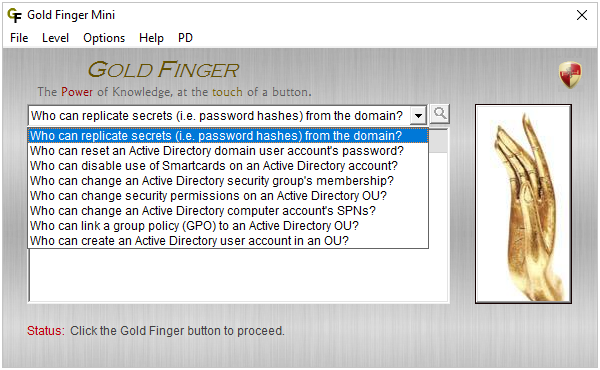
Introducing the Advanced Level of Gold Finger Mini

Folks, 

Today, I'd like to introduce you to the Advanced Level of Gold Finger Mini, quite possibly the world's most capable and powerful cyber security solution -
Gold Finger Mini is the world's only cyber security solution (other than Gold Finger) that can accurately and instantly find out and reveal exactly who has the most powerful privileged access in Active Directory and its Advanced Level offers eight unrivaled fully-automated Active Directory Privileged Access reports that instantly determine and reveal who can enact the most powerful administrative tasks in Active Directory.


Unrivaled Privileged Access Insight

The reports in the Advanced Level of Gold Finger Mini were designed to empower IT personnel, Cyber Security Auditors, Penetration Testers, Ethical Hackers and CISOs at organizations worldwide instantly and accurately determine exactly -

  1. Who can replicate secrets (password hashes) from an Active Directory domain?

  2. Who can reset any Active Directory domain user account's password?

  3. Who can disable the use of Smartcards on any Active Directory account?

  4. Who can change any Active Directory security group's membership?

  5. Who can change permissions on any Active Directory OU (Organizational Unit) ?

  6. Who can change any Active Directory computer account's SPNs (Service Principal Names)?

  7. Who can link a group policy (GPO) to any Active Directory OU?

  8. Who can create an Active Directory user account in any OU?

The cyber security intelligence that these reports uniquely deliver are absolutely essential for securing Active Directory.

However, what you may not know is that, contrary to popular belief, it is very difficult to accurately find out who can enact these privileged tasks in Active Directory, because to do so, one needs to determine Active Directory effective permissions.

Gold Finger Mini is simply the world's only cyber security solution (other than Gold Finger) that can accurately determine effective permissions in Active Directory and accurately make these paramount determinations, at the touch of a button, so now everyone can instantly find out exactly who has the most powerful privileged access in any Active Directory. 


Instant, Unrivaled High-Value Intelligence

As you know, such critical information can be very valuable if you're performing an Active Directory Privileged Access Audit or an Active Directory Security Assessment or if you're trying to pen-test/ethically hack an organization's Active Directory.


If you could find out exactly who can replicate secrets (password hashes) from an Active Directory domain (e.g. by using Mimikatz DCSync), or who can change the membership of any Active Directory security group, such as Domain Admins, or who can reset the password of any domain user account, such as the Administrator account, or who can modify the ACL protecting an organizational unit (OU) that contains thousands of domain user and computer accounts etc. you'd be just one step away from being able to obtain Domain Admin level privileged access in an organization.

The Advanced Level of Gold Finger Mini empowers organizations to be able to instantly and accurately assess who has sufficient privileged access in Active Directory so as to be able to enact the most highly sensitive/powerful administrative tasks that could used to escalate privilege and consequently gain access to just about any IT resource in an organization.


If you were on the defending side, you could instantly lock down privileged access in Active Directory to remove any and all such critical unauthorized access that could instantly result in a massive breach.

If you were on the attacking side (as an ethical hacker or a penetration tester), you could instantly identify the quickest and shortest privilege escalation path leading to any object of interest in Active Directory, whether it be the Administrator account or the CEO's domain user account, the Domain Admins security group or a security group that controls access to a specific organizational IT resource (e.g. Source code Access), any Smartcard enabled account, any organizational unit (OU) containing thousands of Active Directory objects, or the credentials of all domain user accounts in an organization.

With Gold Finger Mini, you can instantly make these paramount determinations at the touch of a button, in seconds, without requiring any admin access or having to do complex Active Directory permissions analysis. Click and done!


Summary

Gold Finger Mini democratizes the unique, high-value, unrivaled cyber security intelligence that our flagship Gold Finger tooling can deliver, and in doing so, it empowers thousands of organizations and millions of IT professionals worldwide to easily, cost-effectively and instantly obtain mission-critical Active Directory privileged access insights.

The Advanced Level of Gold Finger Mini empowers everyone to be able to instantly find out i.e. assess/audit exactly who has the most sensitive/powerful privileged access on virtually any object in any Active Directory domain in the world.

There's simply nothing in the world that compares to it, and to find out why, you just have to try it for yourself.

To learn more and to download the free version, please visit - www.paramountdefenses.com/products/goldfinger-mini
 

Best wishes,
Sanjay

Monday, August 10, 2020

How to Audit Who Can Change Domain Admins' Group Membership?


Folks,

Hello. I hope this finds you all doing well. This post is Day-8 of Active Directory Security for Cyber Security Experts.


Today, I will help you learn how organizations that operate on Active Directory can easily and accurately answer an absolutely essential and paramount cyber security question that impacts their foundational cyber security -


Exactly who can change the membership of the Domain Admins group?


It is extremely important to know how to do so correctly because a single incident involving the unauthorized change of the membership of the Domain Admins privileged security group could instantly result in a massive cyber security breach.


This is Paramount

The Domain Admins privileged group in Active Directory holds the proverbial Keys to the Kingdom and anyone who could change the membership of the Domain Admins group could instantly cause a massive cyber security breach.


Unfortunately, today, most organizations only audit the membership of the Domain Admins group; they do not audit who can change its membership, and those that do usually do so incorrectly, leaving themselves vulnerable to compromise.


How to Correctly Make This 
Paramount Determination -

From a technical perspective, there is only one correct way to find out exactly who can change the membership of the Domain Admins security group and that involves accuratley determining Active Directory Effective Permissions on it.

Specifically, technically speaking, all that one needs to determine is exactly who has Write Property effective permissions to modify the Member attribute on the Domain Admins object, cn=Domain Admins,cn=Users,dc=… in Active Directory.


A Step-by-Step Walkthrough

This is perhaps best illustrated with a simple example, so let us see how to find out who can change the membership of the Domain Admins security group in the lab Active Directory Security VM that everyone can freely download and use.

Consider the Domain Admins security group in the lab VM domain, corp.local -


As one can see, the all-powerful Domain Admins security group contains 3 members, including the default Administrator account, the IT Directory Services Management Team security group and the Privileged Service Accounts security group.

Let us proceed to determine the complete nested membership of the Domain Admins security group in the corp domain -

As seen above, there are a total of 13 accounts that are member of the Domain Admins security group in this domain.

  • Note - Today, at most organizations, security audits are limited to enumerating the membership of the Domain Admins security group. Most organizations do not perform the extra measure of additionally also determining exactly who can change the membership of this group, even though knowing that is equally important.


As indicated above, to find out exactly who can change the membership of the all-powerful Domain Admins security group, we need to find out exactly who has Write Property effective permissions to modify the group's Member attribute.


To do so, let us begin by examining the ACL (access control list) protecting the Domain Admins security group -


As one can see above, there are numerous security permissions granted to numerous security principals in this ACL, and unfortunately it does not appear easy to examine the object's ACL easily using Microsoft's native ACL editor in ADUC.


To help make ACL analysis easier, perhaps we should view the object's ACL using an Active Directory ACL Analyzer -

As seen above, the detailed, easily sortable high-fidelity view makes it so much easier to analyze this object's ACL. We can now easily see that there are a total of 20 security permissions specified in the ACL, including 4 Deny permissions.


A simple examination of the CSV export of this ACL from the tool helps us clearly identify just what we need to analyze -

Specifically, we can now easily see that of the 20 permissions in the ACL, there are only 10 permissions that impact Write Property access on the object, of which 9 grant blanket writes and 1 grants write-property only to the Member attribute.


Equally importantly, notice that of these 10 permissions, 6 allow access and 4 deny access, and as a result, not only will we have to expand the group memberships that are allowed access, but also expand the group memberships that are denied access, and strike off (i.e. remove from) the Allowed list, any accounts that are also on the Denied list.

Here are the 6 security groups/principals that are allowed blanket/member Write Property access -
  1. IT Cyber Security Team - Membership: 5 individual user accounts 
  2. Domain Admins - Membership: 3 nested security groups 
  3. Enterprise Admins - Membership: 3 nested security groups
  4. IT Admin Support Team - Membership: 5 individual user accounts and 1 nested security group
  5. Administrators - Membership: 1 individual user account and 2 nested security groups
  6. System


Similarly, here are the 4 security groups/principals that are denied blanket/member Write Property access -
  1. Spartacus Program - Membership: 6 individual user accounts
  2. IT Local Admin Teams - Membership: 3 nested security groups
  3. IT Help Desk Team - Membership: 10 individual user accounts and 1 nested security group
  4. IT Contractors - Membership: 30 individual user accounts

Thus, in order to accurately make this determination, we will first need to completely expand 13 nested security groups, take into account the direct membership of 50 user accounts, and then meticulously ensure that any user that is both on the Allowed list and on the Denied list is struck off the Allowed list.


In this simple fictional domain, there were only 10 such relevant permissions. In most real-world Active Directory domains, there will easily be many more relevant permissions, and many more groups to expand and conflict resolutions to perform, making this process really difficult, error-prone and time-consuming to perform, and do so with 100% accuracy, each time.


By way of example, if you proceed to meticulously perform all of the security group expansions above in the lab corp.local domain, you will find that there is at least one user, Simon Baker, who is on both, the Allowed and the Denied lists.

Specifically, the IT Admin Support Team, which is allowed the relevant write-property access contains a nested group, IT Admin Support Backup Team, and Simon Baker is a member of this group, so via a nested group membership he does make it on to the Allowed list. However, it turns out that Simon Baker is also a direct member of the IT Help Desk Team, which as one can see above, is denied the relevant write-property access, and so he is also on the Denied list. In effect, the deny will take precedence over the allow, and as a result, even though he is on the Allowed list, Simon Baker will not be able to change the membership of the Domain Admins group!


As clearly illustrated above, the process involved in trying to manually make this determination is substantially complex, error-prone and time-consuming, even when it is essential that there be no mistake, because accuracy is paramount.


It is also worth noting that if we had simply performed Active Directory permissions analysis, even by using a highly capable Active Directory Permissions Analyzer, we would have been making incorrect conclusions, as seen below -

As one can see above, even an advanced Active Directory Permissions Analyzer will report that there are 31 individuals who have been allowed relevant Write Property permissions, including blanket and specific (to the member attribute), and in particular they will report that Simon Baker is also on this list, when in fact Simon Baker is also denied the same access, so he will in fact not actually have the allow access reported by an Active Directory permissions analyzer!


The above example also clearly illustrates why it is not sufficient to merely analyze "Who has what (allow) permissions?" (which incidentally is what most commonly used tools do), because one also needs to correctly intersect deny permissions.

Finally, it is also worth noting that in this specific example, there were no inherited permissions because the ACL protecting the Domain Admins group is a protected ACL. In contrast, the ACLs of most Active Directory objects are not protected, and so there could easily exist both explicit as well as inherited permissions, making the conflict resolution even more complex, because not all deny permissions will negate/override allow permissions. There is a specific order that one needs to know about and take into consideration to correctly perform conflict resolution, and in production domains, this is very difficult.


Now, many folks may point out that there is an Effective Access Tab, accessible via Advanced Security Settings in Active Directory's native tooling that is designed to help calculate effective access/permissions in Active Directory. Yes, there is -


However, if you have ever tried to use it, you know that it is almost useless because of 3 simple reasons - 1) it is not 100% accurate, 2) it can at best calculate an approximation of effective permissions ONE USER AT A TIME, and 3) it cannot pinpoint which underlying security permission in the object's ACL entitles a user to a specific effective permission.

For instance, if you had a 1000 user accounts and a 1000 computer accounts in your Active Directory forest, you would have to use the tab at least 2000 times just to make this one determination, and that too would not be 100% accurate!

  • Note: For the details of these limitations in Microsoft's Effective Access Tab, you may wish to read this post.


So, how are organizations supposed to make this
paramount determination accurately and easily?


We value our time so we use an automated tool that automates the entire process of making this determination for us, reducing the amount of effort involved down to touching a button, and the amount of time required down to seconds -

As seen above, in less than 30 seconds, we were able to accurately determine that there are a total of 30 individuals (i.e. accounts) that in effective have Write Property Member effective permissions on the Domain Admins security group.

[ Solely by way of background, this tool is the world's only accurate Active Directory Effective Permissions Calculator and it can instantly and accurately determine the complete set of effective permissions entitled on any Active Directory object. ]


Now, not everyone tasked with making these paramount determinations (e.g. an IT Auditor, an IT manager etc.) may be proficient in Active Directory, so they may not know how to perform this audit using an effective permissions calculator.

Individuals who may not be proficient in Active Directory could use the following tool to make this determination in simple English without having to know anything about Active Directory (e.g. attributes, permissions, effective permissions etc.) -

As one can see above, this tool, an Active Directory Effective Access Auditor, delivers the same information but in very simple to understand non-technical parlance, making it very easy for non-technical individuals, such as IT auditors, IT managers and IT executives to easily make this determination without knowing anything about Active Directory.


Finally, lets say you wished to find out who can change the membership of not just the Domain Admins security group, but of all security groups that reside in the Users container, such as and not limited to Enterprise Admins, Schema Admins etc.

To fulfill this paramount need, some of the world's top organizations rely on the Active Directory Privileged Access Auditor to make this determination, and do so in minutes. Simply point the tool to the Users container and click a button -

This tool automatically identifies all domain security groups in the specified scope, then automatically determines effective permissions on each one of them, and reveals exactly who can change the membership of every group in the set scope.


Of course, organizations can also make these determinations manually, without using any of the above mentioned tools, by simply having their IT personnel engage in the process outlined above, whenever required. The manual process may be substantially more time-consuming, expertise-reliant and error-prone, but it doesn't require procuring any tools.

Over the last decade some of the most important and valuable organizations in the world, including the U.S. Treasury, have used the tools mentioned above because they save their IT teams a mountain of effort and thousands of hours in time, and because they happen to be the only way to accurately make such determinations without investing a substantial amount of time and effort.


In essence, today organizations can make this paramount
determination both manually, as well as automatically.


Conclusion

The objective of today's post was to help thousands of organizations, their IT personnel, IT Auditors and CISOs learn how to correctly make a paramount determination in their foundational Active Directory deployments.

As we saw above, technically speaking, all that one needs to determine is exactly who has what sufficient Write Property Member effective permissions on the Domain Admins security group.

As we also saw above, in any real-world Active Directory domain, it is not at all easy to manually make this determination with accuracy, even though accuracy us paramount because a single unauthorized user who could enact this task could take over the entire organization in minutes.

Most importantly, as we saw above, albeit there were only 13 accounts that were members of the Domain Admins security group, we were able to identify that there were a total of 30 accounts that could actually change the group's membership!

Thus, organizations that may only be relying on performing basic group membership audits are very likely operating on a dangerously false sense of security today, because as seen above, the number of accounts that can change the membership of the Domain Admins group are far greater than the number of members in the group!

Organizations that do not know exactly how many individuals (employees, contractors, service accounts etc.) can actually change the membership of their all-powerful Domain Admins security group may be at a substantial risk of compromise.


I will conclude this post here. I'll share the next question in a day or so, and answer it on Monday, August 17, 2020.

Thanks,
Sanjay.

Corporate Headquarters

620 Newport Center Drive, Suite 1100
Newport Beach, CA. 92660. USA.


Telephone: 001-949-468-5770

© 2006 - 2026 Paramount Defenses. All Rights Reserved.

Your Privacy

We use cookies to give you the best online experience. Please let us know if you accept these cookies.